Carbon series icon MELLON · CARBON

Documents, tables and slides,
in files you already use.

Carbon is MELLON's family of apps for text and tables. Open, edit and save Word, Excel and PowerPoint files on your Mac. Everything stays on your computer.

Free test versions · macOS 11 or later · Apple silicon & Intel

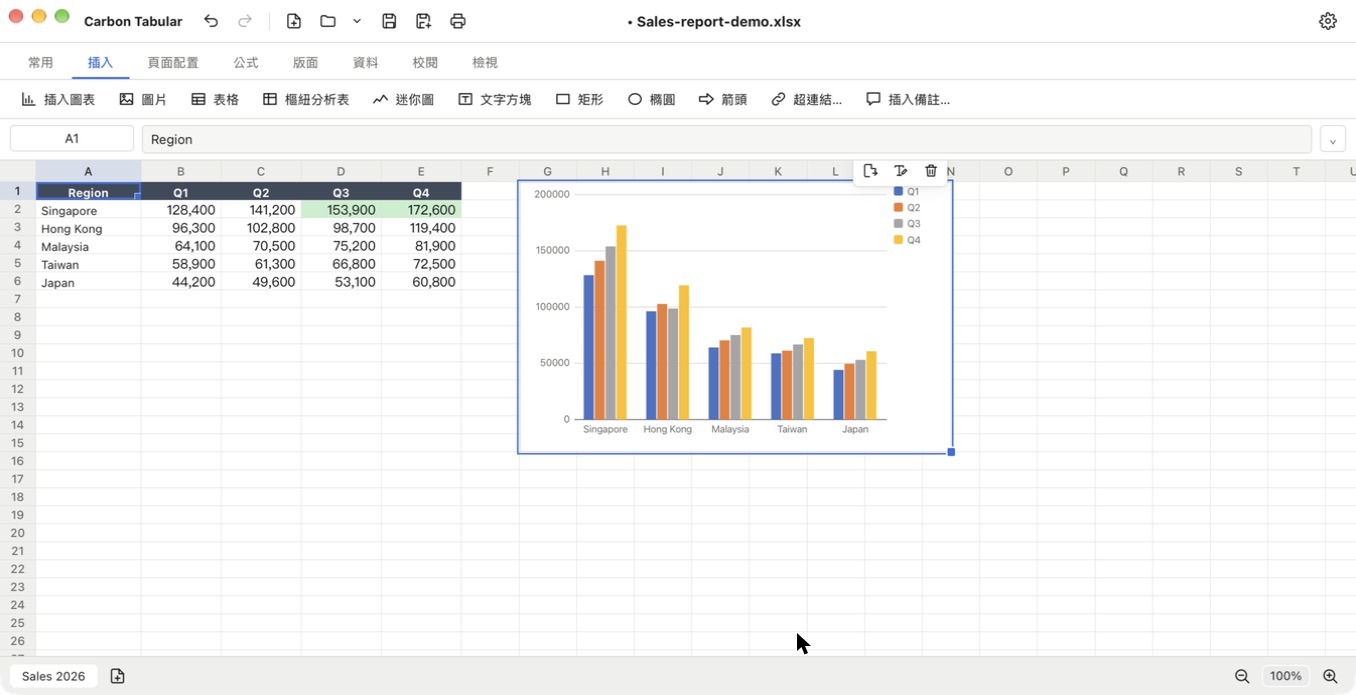
Carbon Tabular showing a sales table with a header row, a highlighted cell rule and a column chart

Apps

The Carbon series, one app at a time.

Carbon Tabular

Carbon Tabular

Spreadsheets

Create, edit and save Excel (.xlsx) and CSV files, with formulas, charts, conditional formatting, data validation, sorting, filters and printing.

macOS 11+ · Apple silicon & Intel Windows: planned Free test version
Carbon Slides

Carbon Slides

Presentations

Create, edit, present and save PowerPoint (.pptx) presentations. For people who use PowerPoint today.

macOS 11+ · Apple silicon & Intel Windows: planned Free test version
Carbon Writer

Carbon Writer

Documents

Create, edit, print and save Word (.docx) documents, with styles, fonts, lists, tables, pictures, links and page setup.

macOS 11+ · Apple silicon & Intel Windows: planned Free test version

What Carbon does

Three apps for the files you already use every day.

Spreadsheets

Formulas, charts, conditional formatting, data validation, sorting, filters and frozen panes, in .xlsx and CSV files.

Documents

Styles, fonts, lists, tables, pictures, links and page setup, in .docx files.

Presentations

Shapes, pictures, tables, charts, themes, transitions and entrance animations, in .pptx files.

Charts and tables

Draw charts from your data in Tabular and Slides, and insert tables in Writer and Slides.

Present

Present full screen from the first or the current slide, with speaker notes.

Print and export

Print documents and spreadsheets, and export slides to PDF or PNG.

Recover your work

If an app quits unexpectedly, your unsaved work can be restored when you reopen it.

Familiar formats

Open and save .xlsx, .docx and .pptx files, so you can share them with people who use Office.
Private by design

Your files are opened and saved on your own computer and are never uploaded.

Works offline

No account and no internet connection needed to use the apps.

Three languages

Interface in English, 繁體中文 and 简体中文, with Chinese text handled properly.

A look inside

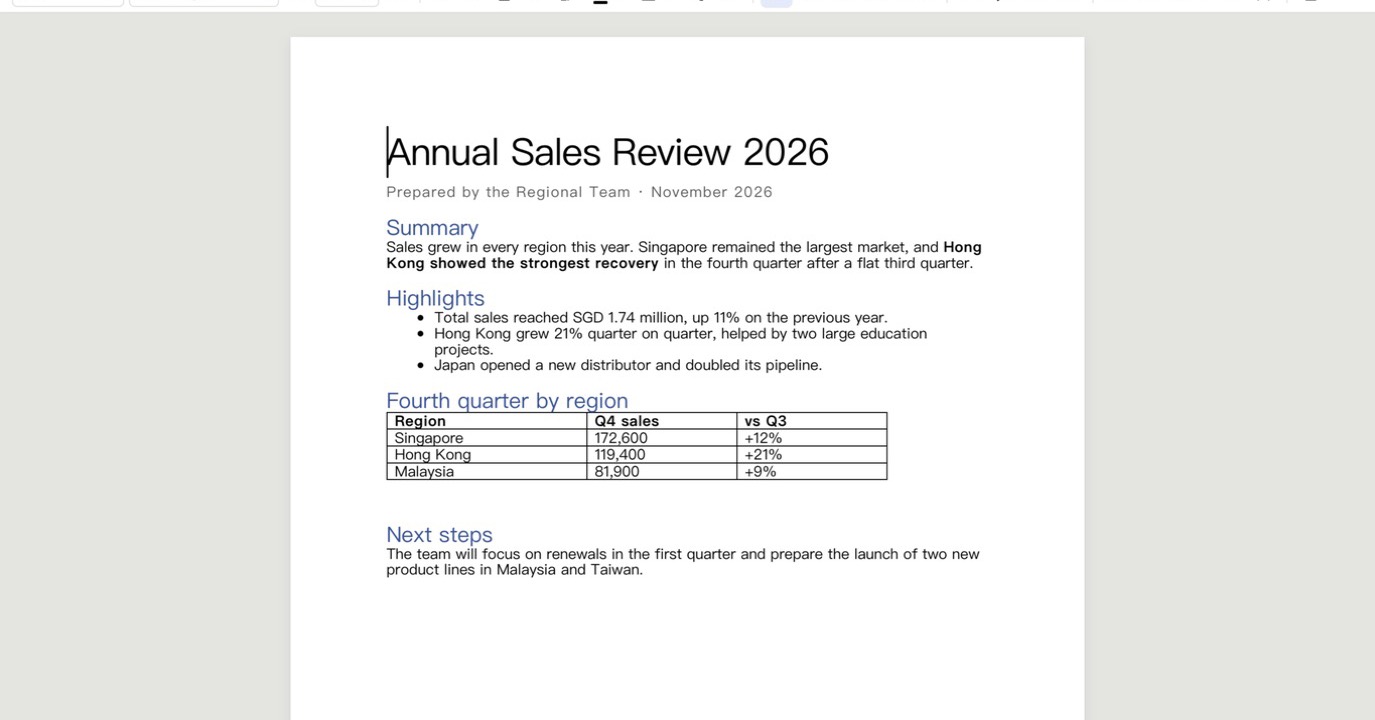
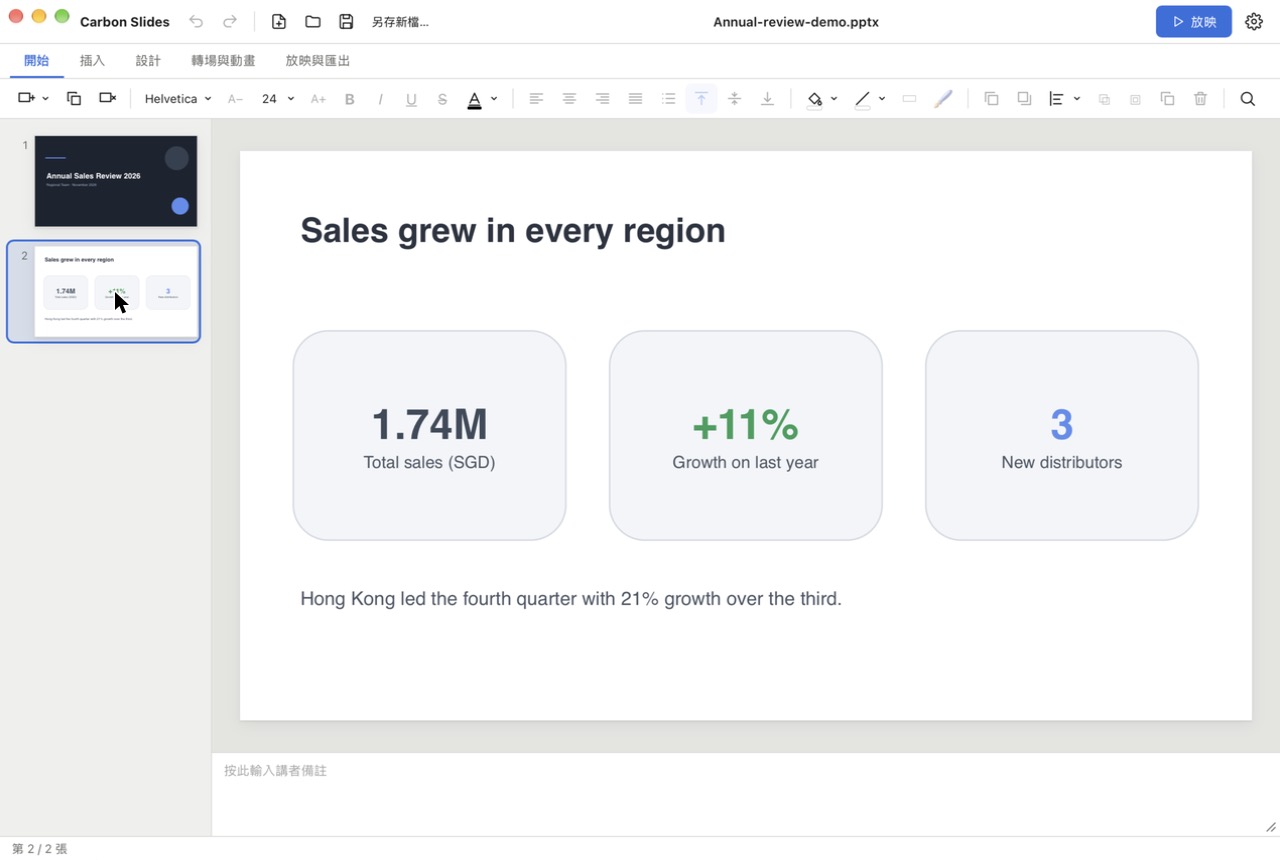
A spreadsheet with a chart, a report, and a slide deck.

Carbon Tabular showing a sales table with a header row, a highlighted cell rule and a column chart
Carbon Tabular: tables, formatting and charts.
Carbon Writer showing a report with a title, headings, bullet points and a table
Carbon Writer: styled documents with lists and tables.
Carbon Slides showing a slide with three rounded cards and a slide list on the left
Carbon Slides: shapes, text and themes, ready to present.

Download

The Carbon apps are in free testing. Download them, try them on your own files, and tell us what to improve.

Carbon Tabular

Carbon Tabular

Test version coming soon

Email us to join the test list

Carbon Slides

Carbon Slides

Test version coming soon

Email us to join the test list

Carbon Writer

Carbon Writer

Test version coming soon

Email us to join the test list

Easier with Element Hub

Element Hub is one launcher for all MELLON software. It shows which apps you have, and offers Download, Open or Update.

Element Hub

Element Hub

Test version coming soon

Email us to join the test list

Installing a test version

  1. 1

    Open the downloaded .dmg and drag the app into Applications.

  2. 2

    Control-click the app, choose Open, then click Open again.

  3. 3

    If macOS still blocks it, go to System Settings → Privacy & Security and click Open Anyway.

Test versions are not yet notarised by Apple, which is why macOS asks you to confirm. You only need to do this once for each app.

Requirements

  • macOS 11 Big Sur or later
  • Apple silicon (M1 and later) or an Intel Mac
  • About 150 MB of disk space

Questions

Are my files uploaded anywhere?

No. Carbon apps run on your computer and process files locally. They do not send your files to a server.

Are the test versions free?

Yes. They are free to download and use while we test. Feedback is welcome at hello@mellongp.com.

Will my Word, Excel or PowerPoint files keep their formatting?

The apps read and write the standard .docx, .xlsx and .pptx formats. A few things, such as headers, footers, footnotes and comments in existing Word files, are not kept yet, so the app asks before overwriting such a file.

Is there a Windows, iPhone or Android version?

The Mac versions come first. Windows is planned after the first test versions.

What happened to Carbon Hub?

Carbon Hub has been replaced by Element Hub, which manages all MELLON software, not just Carbon.